
A low monthly payment can hide a high total loan cost. To calculate the total cost of a loan, multiply the payment by the number of payments, then subtract the amount borrowed to estimate interest. Use the full repayment schedule, not just the monthly payment, to see what you’ll repay overall.
It’s easy to focus on whether a payment fits your budget, but the loan term matters too. A longer term usually lowers each payment while giving interest more time to accrue. Compare both the payment and the full repayment amount before weighing your options.
This guide explains how to total payments, compare amortized, simple-interest, interest-only, and lump-sum repayment structures, and build the calculation in Excel. You’ll also learn how changing payment amounts can affect total interest, helping you review the numbers before deciding whether to borrow.
Key Takeaways
- Use the payment schedule to separate the full amount repaid from the interest cost.
- Identify whether a loan is amortized, simple-interest, or interest-only before comparing its repayment pattern.
- For a lump-sum loan, account for the balance due at maturity, not just payments made along the way.
- Set up an Excel calculation to compare repayment scenarios and see how extra monthly payments affect interest.
Calculating total loan cost from payment amount and number of payments
Use the payment schedule to total repayments, then subtract the loan amount to estimate interest.
In the United States, rules for origination fees, prepayment penalties, and other charges can depend on the loan type and applicable jurisdiction. Review the agreement and disclosures to identify which charges apply to a specific loan.
-
Gather Payment and Payment-Count Details
Record the payment amount and the total number of payments, then multiply them to find the scheduled repayment total. Compare that result with the amount borrowed to estimate interest. Use the payment schedule’s actual payment count, especially if payment frequency or the final payment differs from the regular schedule.
-
Estimate Monthly Payments and Total Costs
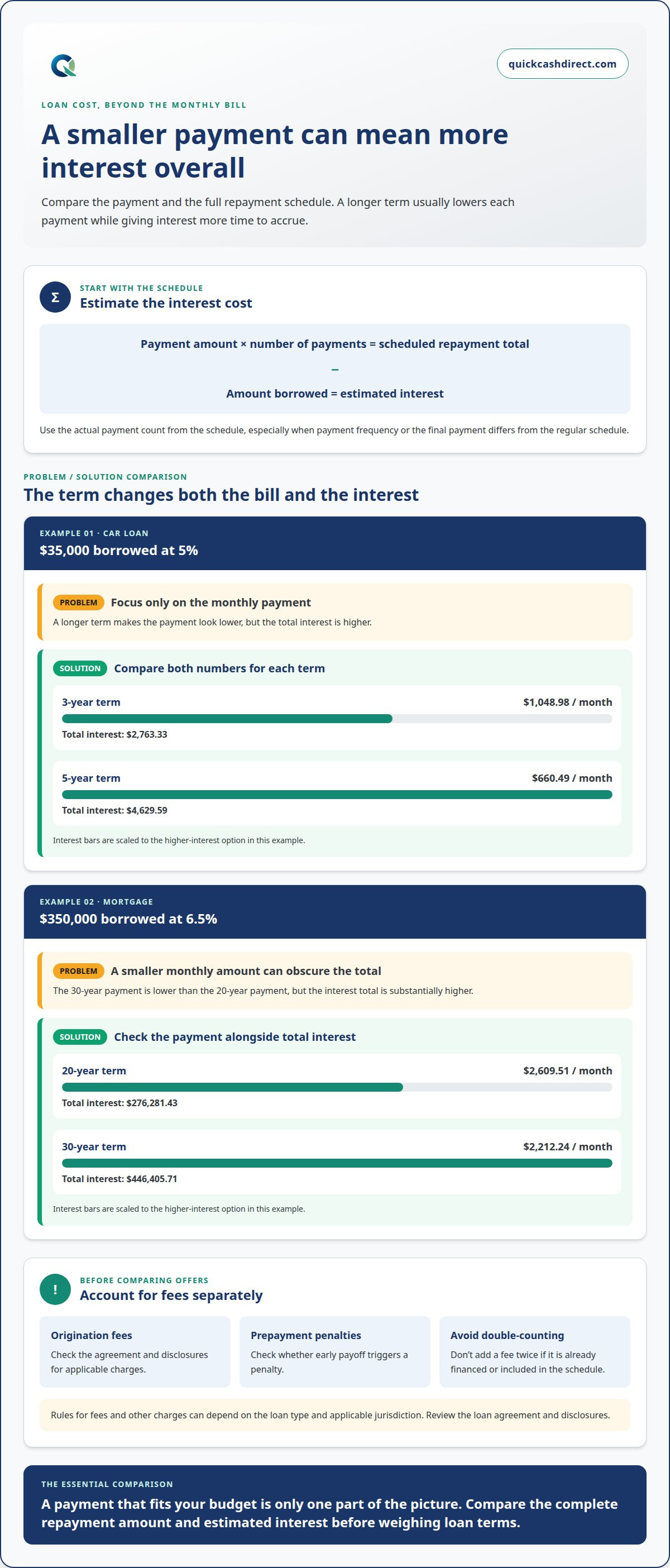
Estimate the monthly payment and total interest before comparing loan terms. For a $35,000 car loan at 5%, a three-year term has a $1,048.98 monthly payment and $2,763.33 total interest. A five-year term lowers the payment to $660.49 but raises interest to $4,629.59. For a $350,000 mortgage at 6.5%, a 20-year term costs $2,609.51 monthly, with $276,281.43 interest. A 30-year term lowers the payment to $2,212.24, while interest rises to $446,405.71.
-
Account for Fees and Other Charges
Review origination fees, prepayment penalties, and other charges separately from scheduled payments. Add applicable charges to the repayment total to estimate the loan’s overall cost. Don’t count a fee twice if it is already financed into the loan amount or included in the payment schedule. Check how early payoff affects the balance and whether a penalty applies. The agreement and disclosures identify applicable charges; rules vary by loan type and jurisdiction.
Amortized, simple-interest, and interest-only loans
Identify how each loan applies payments before comparing total costs. The repayment structure determines when the principal falls and how interest accumulates.
-
Identify Principal and Interest Costs
Separate principal, the amount borrowed, from interest, the cost of borrowing. An amortized payment covers both, and the principal balance declines over the repayment schedule. Simple interest is calculated as principal multiplied by rate and time. With interest-only payments, regular payments cover interest while principal remains due separately. Add principal and interest to estimate the loan cost before applicable fees.
-
Compare Terms, Rates, and Total Interest
Compare the same loan amount across repayment terms and interest rates. A calculator can help you compare costs. Fixed rates stay unchanged under the loan terms; variable rates can change, affecting payments and total interest.
-
Account for APR and Fees
Distinguish the interest rate from APR when comparing offers. The interest rate measures the cost of borrowing principal; APR expresses the yearly borrowing cost and includes interest and fees. Identify applicable charges, such as origination fees or prepayment penalties, and include them in your comparison. Don’t add a charge twice if it already appears in the payment or APR calculation. Read the repayment terms for fee timing and early-payoff conditions.
Lump-sum repayment at loan maturity
For a lump-sum loan, total repayments include scheduled payments and the balance due at maturity. Extra payments or early payoff can reduce interest because interest accrues over time. Compare the payoff amount with the original principal to assess the borrowing cost.
- Identify the loan term and repayment schedule. A five-year term sets a maturity date when any remaining balance becomes due. Separate regular payments from the final lump sum, and don’t assume the regular schedule fully repays the principal. Check how the contract applies each payment and calculates the amount owed at maturity.
- Add every scheduled payment to the final amount due. That sum represents total repayments before additional charges. Subtract the amount borrowed to estimate interest, then include applicable charges separately. For a personal loan or mortgage, use the actual payoff balance at maturity, not an estimated balance from an earlier date.
- Compare lump-sum terms with familiar installment examples. These examples show how payment frequency and loan duration shape total repayments, but neither describes a lump-sum contract. For a balloon structure, add the final balance to the earlier payments.
- Estimate the effect of extra payments before changing your schedule. In an illustrative $20,000 loan with a five-year term and a 4.5% interest rate, paying an extra $100 monthly reduces total interest from $2,371.62 to $1,817.59. Early payoff can also save interest. Compare the remaining balance and payoff timing, since lenders calculate final amounts using the loan’s terms.
- Plan for the maturity date before borrowing. A large final payment can outweigh the smaller payments that came before it. Compare the required lump sum, total interest, and repayment duration with an installment loan’s full schedule. This clarifies the trade-off: the payment pattern affects when money is due, while the complete schedule reveals total cost.
Calculating total loan cost in Excel
Build a monthly repayment schedule in Excel to track payments, principal, interest, and the remaining balance. This shows how extra payments change total interest, not just the payment amount.
- Enter the loan amount, annual interest rate, term in years, and any extra monthly payment in separate cells. For example, use the $10,000 principal from the illustrative Excel loan example, then enter the rate and term from the loan you’re analyzing. Keep the inputs separate so you can change one assumption without rebuilding the worksheet.
- Calculate the regular monthly payment with Excel’s PMT function. If the principal is in B2, annual rate in B3, and term in years in B4, use
=PMT(B3/12,B4*12,-B2). This converts the annual rate into a monthly rate and the term into monthly periods. Confirm the payment frequency matches the loan before using the result. - Create a row for each monthly repayment. Use columns for beginning balance, interest, payment, principal repaid, and ending balance. Calculate monthly interest as beginning balance multiplied by the annual rate divided by 12. Subtract that interest from the payment to find principal repaid, then subtract principal repaid from the beginning balance. Add any extra payment to the regular payment, while limiting the final payment to the amount still owed.
- Sum the payment column to find total repayments. Subtract the original loan amount to estimate total interest, then include applicable charges separately. Use the same layout to compare personal-loan repayment scenarios. A credit card balance needs different assumptions if payments or borrowing vary, so don’t automatically treat it as a fixed-term loan.
- Change the extra-payment input and compare the new payoff schedule with the original. The difference in summed interest shows the impact of paying more each month. If you’re considering borrowing while managing bad credit, review loan options for bad credit alongside your repayment estimates.
QuickCashDirect
QuickCashDirect offers loan options for readers considering short-term borrowing. If you need to cover an urgent expense, you can explore Payday Loans, Cash Advance, Payday Loans Online, and Loans for bad credit.
Use the payment schedule and total-cost calculations in this guide to assess how a potential repayment fits your budget. Focus on the amount due, payment frequency, and full repayment terms before choosing an option. A lower payment alone doesn’t show how much you’ll repay overall.
For a borrowing option that matches your needs, contact QuickCashDirect.
Make Your Next Borrowing Decision With Clarity
Use your cost estimate as a decision tool, not just a final number. Before borrowing, consider how payments fit alongside essential expenses and when your income arrives. A repayment plan should remain manageable within your regular budget, not just during an unusually comfortable month.
Knowing how to calculate the total cost of a loan gives you a clearer basis for deciding whether to proceed, adjust the amount, or wait. Revisit your estimate if the repayment terms change. A different payment schedule or added charge can affect what you ultimately repay.
When you’re ready to explore borrowing options, contact QuickCashDirect to discuss your next step. Bring your repayment priorities into the conversation, and focus on choosing an option that fits your needs. Take the time to make a clear, confident decision.
Frequently Asked Questions
What is the formula for calculating the total cost of a loan?
Add every scheduled payment and separately paid charge, then subtract the cash you actually receive. This gives the borrowing cost, including interest and fees. Total repayments alone also include returned principal. If a fee is deducted before funds reach you, use the net amount received as your starting figure. Don’t add a financed fee again if it’s already included in the balance or payments.
How do you calculate total loan payments using APR, loan term, and principal?
For an estimated fixed monthly payment, set the periodic rate to APR divided by 12 and the payment count to the loan term in months. Use the amortizing payment formula: principal multiplied by the periodic rate, divided by one minus (one plus the periodic rate) raised to the negative payment count. Multiply the result by the payment count for scheduled repayment total. Apply the contract’s rate and fee treatment for an exact comparison.
How do you calculate loan amortization and total interest paid?
For each payment period, multiply the opening balance by the periodic interest rate to find that period’s interest. Subtract the interest from the payment to find the principal reduction, then subtract that reduction from the opening balance. Repeat for each scheduled payment and add the interest entries to find total interest. Rounding can affect the final payment, so use the agreement’s actual schedule to reconcile the result.
How can you compare the total cost of two loan offers?
Compare offers using the same amount received and a consistent repayment period. Record each payment, the payment count, APR, and separately charged fees. Calculate total repayments, distinguishing returned principal from borrowing costs. Check whether either offer has a variable rate, a different payment frequency, or a final lump sum. A lower monthly payment alone doesn’t show which offer costs less overall.
What tools or calculators can estimate the total cost of a loan?
A loan calculator can estimate the periodic payment and scheduled repayment total using principal, rate, and term. Excel can model the same inputs in a payment-by-payment schedule and let you change assumptions. Use a spreadsheet to test different payment amounts or repayment dates. For a credit card balance or a loan with a final lump sum, choose a calculation method that reflects that repayment structure.
How do fixed-rate and variable-rate loans differ in total cost?
A fixed rate stays unchanged under the loan terms. A variable rate can change, affecting payments and total interest.